
A search for "bedtime story apps" returns dozens of options, most of them claiming to help kids sleep better, all of them beautifully designed marketing pages. The actual experience of using them at 8 PM with a tired child is very different. Some help. Some are entertaining but keep kids up longer. Some are straightforwardly bad — loud narration, built-in ads, chatbot interactivity that has no place at bedtime.
This guide is not a ranked list of "top 10 bedtime story apps." Those lists get stale in weeks and rarely explain why one app is better than another. Instead, this is a criteria-first guide — the six qualities that matter in a bedtime story app, the red flags that rule one out, and category-by-category guidance for picking the right fit for your child.
By the end, you'll know what to look for on any app store page — and how to quickly disqualify the ones designed for engagement rather than sleep.
Why "Best App" Depends On What You Need
A 2-year-old who fights bedtime needs a very different app from an 8-year-old who has trouble winding down after a busy school day. Before comparing apps, sort yourself into one of these buckets:
- You want help filling the 20-minute gap after lights-out. You already read a book; you need something that covers the stretch between goodnight and sleep.
- You want stories that address a specific situation. Your child is scared of the dark, about to become a big sibling, or starting kindergarten. You want a library or generator that hits that theme.
- You want endless variety so the same story doesn't get requested for the 50th time. A personalization-capable or AI-generated app.
- You want a portable bedtime for travel. A familiar voice, stories that work regardless of location.
- You want something for siblings of different ages. An app with clear age-appropriate browsing.
The best app for one of these is not the best for another. Start with what you actually need, then apply the criteria below.
The Six Criteria That Actually Matter
Every bedtime story app is trying to sell you on different "features." Most of them don't matter. These six do.
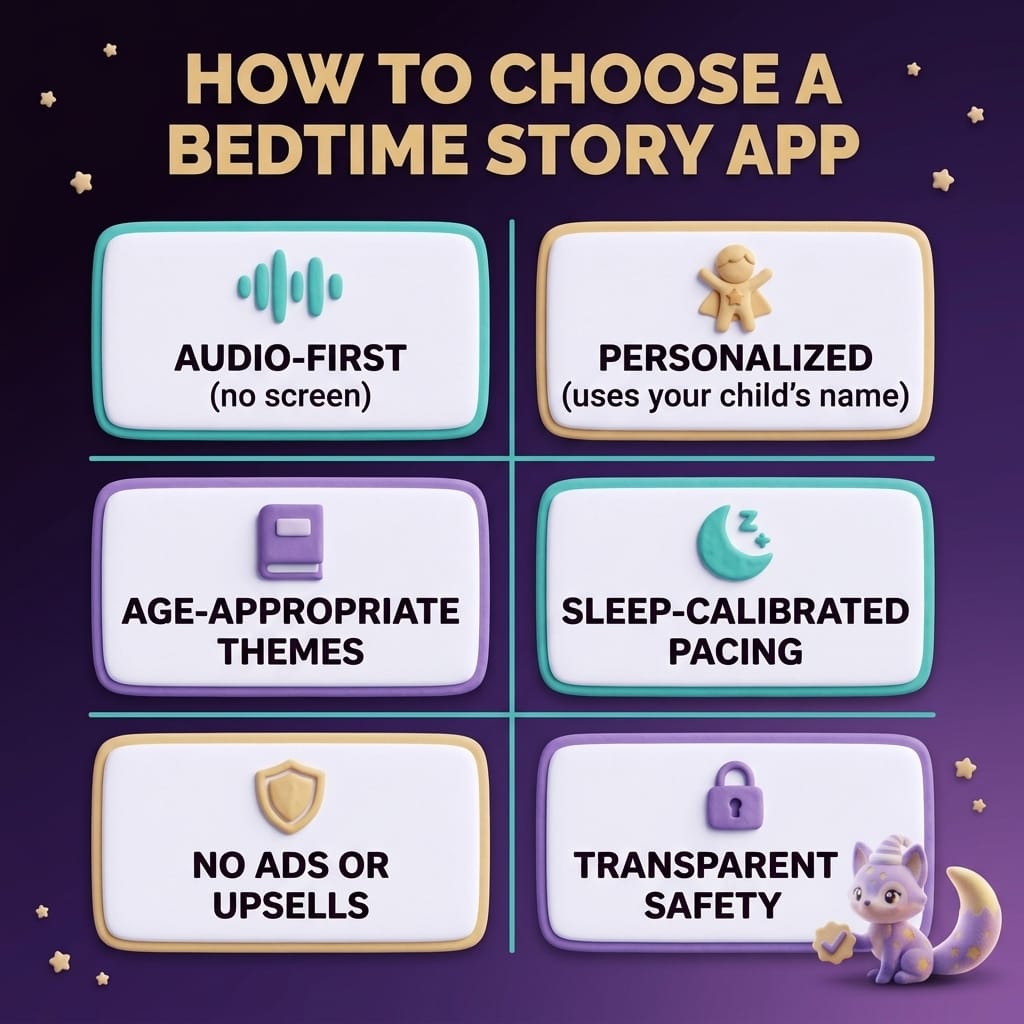
1. Audio-first (no screen at bedtime)
This is the single most important criterion. The American Academy of Pediatrics recommends no screens in the hour before sleep. A study by Hale and Guan in Sleep Medicine Reviews (2015) confirmed that screen exposure before bed measurably delays sleep onset, suppresses melatonin, and reduces total sleep time in children.
A good bedtime story app is audio-first: you pick the story through a screen before bedtime, then hand off to audio-only playback. Screen brightness is not softly dimmed in "kids mode" — it is off. If an app requires your child to watch animations, illustrations, or video during the story, it is a content app, not a bedtime app. We cover this distinction in depth in our guide to audio stories vs reading.
2. Age-appropriate themes and content curation
Any app that targets "kids ages 2–12" with the same library is not serving any of those ages well. A story written for an 8-year-old will bore or confuse a 2-year-old. A story for a 3-year-old will bore a 7-year-old. Look for apps that clearly split content by age and have pre-vetted themes that match child development stages.
3. Sleep-calibrated pacing
This is subtle but makes the biggest difference in whether a story actually helps a child fall asleep. A good bedtime story has a wind-down arc: action and energy peak early, then the language softens, the pace slows, and the final minutes are almost a guided drift into sleep. Many "kids' story" apps were originally built for daytime entertainment and retrofitted for bedtime — the stories are exciting, witty, and structurally wrong for sleep. Listen to a sample story all the way through before committing. If it ends on a punchline, a cliff-hanger, or a cheerful "the end!" it is not designed for sleep.
4. Meaningful personalization (not just the child's name)
Decades of psychology research document the self-reference effect: people remember and engage more deeply with information when it relates to themselves. Even toddlers show this effect strongly (Ray & Bryant, 2022). The best apps go beyond slotting a name into a template — they incorporate the child's age, interests, and sometimes a current life situation (a fear, a life change) into the story structure. For more on why this works, see our personalized bedtime stories guide.
5. Zero ads, no mid-story upsells
This one is non-negotiable. Bedtime is the worst possible moment for an ad or an upsell prompt. The ad breaks the calm state your child just reached; the upsell creates friction right when the environment should be getting quieter. Check the app's free tier and paid tier separately — some apps are clean on paid but ad-filled on free. If you are trying the free tier at bedtime, test it in advance to see what your child will actually experience.
6. Transparent content safety and data practices
Pay particular attention if the app uses AI to generate stories (covered in depth in our AI bedtime stories guide). Questions worth answering before installing:
- Is there explicit input and output filtering for inappropriate content?
- Are story themes pre-vetted or generated from arbitrary prompts?
- Is your child's personal data (name, interests) stored? For how long?
- If voice cloning is offered, how is your voice sample secured?
A reputable app answers these in plain language. An app that buries these questions in legalese or doesn't address them at all is a pass.
Red Flags That Rule an App Out
Before picking an app, use this quick disqualifier list. If you see any of these, skip.
- Screen-required during stories. Animations, video, tap-to-interact during the narration. This is the biggest one.
- Open-ended chatbot features. Any "ask the AI anything" or free-form prompt input for kids. Unfiltered AI output has no place in a kids' product.
- Ads or upsells during stories. Even one ad during a "free" story is enough.
- No clear age guidance. If the app doesn't distinguish content for a 3-year-old vs a 9-year-old, it is not serious about child development.
- Exciting, loud, plot-heavy narration. If the sample story is told at full dramatic-reading energy, with big character voices and sound effects, it is for entertainment, not sleep.
- Timers that cut the story off. Story ends mid-sentence after 15 minutes? That will wake your child more than it helps them sleep.
- Requires an account before you can hear a single story. If you can't try before committing an email, that's usually a sign the free experience is weak.
Categories of Bedtime Story Apps
Rather than ranking specific products (which shift constantly), here is how to think about the landscape.
Category A: Curated library apps
Pre-written professional stories from a catalog. Examples of apps in this category: Moshi, Calm Kids, Headspace for Kids, Nighty Night (Fox & Sheep), Storybook. Strengths: curated quality, narration often by professional voice actors, consistent tone. Limitations: content is the same for every child, no personalization, your child may hear "their favorite" too many times.
Best for: Parents who want reliability and don't care about personalization. Good for toddlers who love repetition.
Category B: Personalized story apps
Stories customized with your child's name, age, and interests. Some are template-driven (name slotted into a pre-written story), others are fully AI-generated within safety guardrails.
Best for: Parents who want infinite variety and kids who disengage from repeated stories. Especially useful when your child is processing a specific emotion or life event — see personalized bedtime stories.
Category C: AI-generated story apps
A subset of the above. The whole story is generated on demand, within pre-vetted themes and age-appropriate narrative structures. Quality varies hugely — a well-built AI story app is the best experience in this space; a poorly-built one is the worst. Safety design is everything here. Covered in detail in AI bedtime stories for kids.
Best for: Families who want endless, tailored content and are willing to evaluate safety features carefully.
Category D: Audiobook and podcast apps (general-purpose)
Not specifically designed for bedtime, but can be used that way. Platforms like Audible (kids section), Spotify Kids, Apple Books audiobooks.
Best for: Older kids (7+) who have specific tastes and can sit with a longer narrative. Less effective for sleep-induction because pacing is not usually calibrated for it.
Category E: Story+sleep-sound hybrids
Apps that combine stories with white noise, nature sounds, or gentle music. Some of these work well; some are over-designed and stimulating.
Best for: Kids who need continuous sound coverage across the night, paired with a story for the first 10–20 minutes. Pairs well with a guide like white noise for babies and toddlers.
Dreamloo's Place in This Landscape
We built Dreamloo because we couldn't find a bedtime story app that hit all six criteria above. Most apps nailed two or three. The rest were leaked budget on animation and interactivity that worked against the goal.
What Dreamloo focuses on:
- Audio-first by design. Setup takes under a minute on a phone; from there, the story plays with no visual stimulation.
- Personalized with child-development–informed themes. Your child's name, age, and a situation they're working through shape the story within themes built for sleep.
- Sleep-calibrated pacing. Every story follows a wind-down arc — action peaks early, the final minutes are almost a guided drift.
- No ads. Ever. At any tier. The free tier is genuinely free; it is not ad-supported.
- Explicit safety layers. Input filtering, output filtering, age-appropriate theme libraries.
Try a few free Dreamloo stories to see how it feels, without a signup gate.
How to Actually Try a New Bedtime Story App
A process for evaluating any app before committing it to your nightly routine:
1. Listen to a full story yourself first
Before ever using the app with your child, play one story all the way through in your own headphones, during the day. Pay attention to the pacing, the voice, the ending. If you feel calm at the end, it is sleep-friendly. If you feel slightly activated, your child will too.
2. Test the volume at the lowest setting
Some apps cannot get quiet enough at their lowest volume for a sleeping child. Hold the phone at your child's ear height and adjust — bedtime volume should be softer than conversational speech.
3. Run a screen-off dress rehearsal
Pick a story, hit play, set the device face-down on the bedside table or in airplane mode. Make sure there is no way for the screen to wake up during the story (notifications, a skip-to-next-chapter popup, an auto-play prompt at the end).
4. Try it for one week before deciding
First-night novelty can make any app feel great. Give it a week. Watch whether your child actually falls asleep faster, stays asleep better, and looks forward to the story without being over-activated by it.
5. Keep one backup
Even the best app occasionally glitches or has a story your child doesn't vibe with. Have one backup app or a few downloaded audiobook tracks so a technical hiccup doesn't derail bedtime.
Common Questions from Parents
What if my child wants to watch the animations instead of just listening?
This is common with apps that offer both audio and video. The choice is yours: some parents accept lower-quality sleep for the first few nights while the child expects the visuals, then transition to audio-only once the new routine is established. Others pick audio-only apps from the start to avoid the screen-gravity problem entirely. The second approach tends to work faster for kids under 6.
Should I let my child browse the app themselves and pick a story?
Usually no, especially under age 6. Letting a tired child scroll through a library adds 5–10 minutes of decision-making and screen stimulation right when they should be winding down. Pick two or three stories yourself earlier in the evening, then present a simple "story one or story two?" choice at bedtime.
Can I use a Bluetooth speaker with story apps?
Yes, and we recommend it. Set up the story on your phone, connect to a Bluetooth speaker in your child's room, then put the phone in airplane mode (or just put it face-down in another room). Zero screen in the bedroom, clean audio from the speaker.
My child loves one specific story and asks for it every night. Is that a problem?
No, this is normal and often beneficial. Repetition is how toddlers and young children master language and find emotional safety. Let them hear their favorite. Our guide to the best bedtime stories for toddlers goes deeper on why repetition works at bedtime.
Are free bedtime story apps ever good?
Yes, when they are genuinely free — funded by a paid tier rather than by ads. Apps that are ad-supported in their free tier are not worth using at bedtime. Check the specific free-tier experience, not the paid one described on the website.